Cozy Season Design: The Hot Cocoa Weather Canva Frame
Unlocking the Aesthetic of Warmth
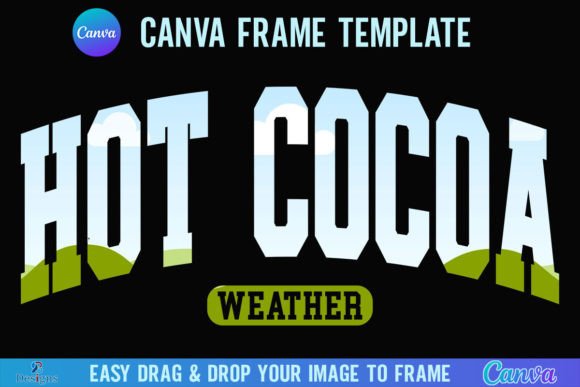
There is a specific visual language associated with the colder months that goes beyond simple snowflakes. It is the feeling of a wool sweater, the steam rising from a mug, and the comfort of staying indoors. For designers, marketers, and content creators, capturing this "Hygge" or cozy aesthetic requires the right assets. The Hot Cocoa Weather Canva Frame Season is a specialized digital asset designed to bridge the gap between standard photography and that warm, inviting atmosphere. This is not just a filter; it is a structural element for your creative work.
As a design professional, I often look for assets that save time without sacrificing quality. This package provides exactly that. When you purchase this item, you receive a zip file containing a PDF. The document is straightforward: it includes a direct link to access the Canva templates. You will find two distinct versions inside: Grouped and Ungrouped. This distinction is crucial for workflow efficiency. The "Grouped" version keeps the frame elements locked together, ensuring you don’t accidentally misalign the intricate border details while dragging your background images. The "Ungrouped" version allows for granular editing, letting you move, recolor, or modify individual components of the frame if you wish to customize the design further.
Technical Specifications and Workflow
One of the most significant advantages of the Hot Cocoa Weather Canva Frame Season is its resolution. At a massive 4000x4000 pixels, this template is built for high-fidelity output. Whether you are designing for digital screens or preparing files for print-on-demand services, the square aspect ratio and high resolution ensure your work remains crisp. You do not have to worry about pixelation when cropping into specific details of the frame.
The user experience is designed for simplicity. The workflow relies on Canva’s native functionality. Once you access the templates via the link, you simply drag and drop any PNG or JPG background image into the designated frame area. The frame acts as a mask, instantly transforming a generic stock photo into a themed seasonal graphic. This is particularly useful for:
- Social Media Managers: Creating cohesive Instagram grids or Facebook cover photos for winter campaigns.
- Small Business Owners: Highlighting seasonal product shots for e-commerce listings or holiday sales.
- Bloggers: Creating feature images that immediately signal "cozy content" to readers.
Design Integration and Brand Perception
Using a thematic asset like the Hot Cocoa Weather Canva Frame Season does more than just decorate an image; it influences brand perception. In modern typography and graphic design, consistency is key to building trust. When you apply a specific style to your visuals, you create a brand identity. This frame helps establish a visual hierarchy where the product or subject is the focal point, supported by a border that suggests warmth, comfort, and professionalism.
Consider the psychology of your audience. Adults aged 20 to 50, including designers and entrepreneurs, respond to visual cues that align with their current environment. During the fall and winter, a standard white border feels sterile. However, a frame that evokes the texture of hot cocoa weather—perhaps with rich browns, soft creams, or festive accents—immediately engages the viewer emotionally. It makes the content feel more intentional and curated.
Practical Application for Commercial Projects
For those working in commercial spaces, such as packaging design or editorial design, this asset offers versatility. While it is a Canva template, the output can be integrated into larger workflows. You can create the framed image in Canva, download it as a high-quality PNG (with a transparent background if you have Canva Pro), and import it into Adobe Photoshop or InDesign for more complex layouts.
However, it is important to note the limitations. This is a digital product; no physical frames are shipped. It is strictly a Canva Frame Template. It is not an SVG file, which means it is not suitable for use with Cricut Design Space or Silhouette cutting machines. This is a digital design asset, not a die-cut template for physical crafting. Keeping this distinction clear ensures you use the tool for its intended purpose: digital content creation.
Optimizing Your Visuals
To get the most out of the Hot Cocoa Weather Canva Frame Season, think about the composition of the images you place inside it. Because the frame adds a decorative border, the internal image should be relatively clean to avoid visual clutter. A portrait with a blurred background or a product shot on a solid color background works best. The frame provides the "noise" and texture; your subject provides the clarity.
Ultimately, this asset is about efficiency and aesthetic alignment. It allows you to maintain a professional look across your digital platforms without spending hours designing borders from scratch. By utilizing the grouped and ungrouped options, you maintain control over your design while speeding up your production time. It is a practical, high-value addition to any digital creator's toolkit for the season.
Cozy Season Design with the Hot Cocoa Weather Canva Frame
Capturing the Essence of Warmth in Your Visuals
There’s a distinct shift in visual tone when the weather turns cold. Designs move from bright, airy pastels to richer, warmer palettes that evoke comfort and nostalgia. The Hot Cocoa Weather Canva Frame Season template is built precisely for this transition. It’s a digital asset designed to instantly wrap your images in that cozy, inviting aesthetic—think the visual equivalent of a soft blanket and a steaming mug. This isn’t just a border; it’s a mood-setter for your brand’s seasonal content.
As a designer or content creator, your goal is to make your audience feel something immediately. This frame does the heavy lifting. The package you receive is simple and practical: one zip file containing a PDF. Inside that PDF is a direct link to access two versions of the template in Canva. You get a Grouped version, where all frame elements are locked together for seamless dragging and dropping, and an Ungrouped version, which lets you tweak individual components if you want to customize colors or details. It’s about giving you control without complexity.
Practical Specifications for Real-World Projects
Let’s talk technical details because they matter for your final output. The template is sized at 4000x4000 pixels. This generous, high-resolution square format is versatile—it’s perfect for social media posts, product mockups, or even print projects like postcards or small posters. The square ratio is inherently balanced and works well across most platforms, from Instagram feeds to Pinterest pins.
The core function is straightforward: you drag and drop any PNG or JPG image into the frame. The frame acts as a mask, instantly transforming a standard photo into a curated seasonal graphic. This is a massive time-saver for:
- Small Business Owners: Quickly create professional-looking product photos for holiday promotions or gift guides.
- Bloggers and Publishers: Generate consistent, on-brand featured images for articles about recipes, gift ideas, or seasonal lifestyle content.
- Social Media Marketers: Maintain a cohesive visual feed during the fall and winter months with minimal effort.
Remember, you’ll need a free Canva account to access and edit the template. If you need to export your final design with a transparent background (to overlay it onto another design), that requires a Canva Pro subscription or higher. This is a digital product only—no physical item will be shipped.
Enhancing Brand Consistency and Audience Connection
Using a themed asset like the Hot Cocoa Weather Canva Frame Season is a strategic move for your brand identity. Consistency in visual style builds recognition and trust. When your audience sees that warm, textured frame across your seasonal content, they immediately associate it with your brand’s curated aesthetic. It creates a visual shorthand that says, “This is our cozy season look.”
This frame excels at establishing visual hierarchy. The decorative border draws the eye inward, focusing attention on the central image. It adds a layer of professionalism and intentionality that a plain photo lacks. For entrepreneurs and marketers, this translates to higher engagement. A well-framed image feels more valuable and complete, which can increase click-through rates and shares. It’s a subtle but powerful way to elevate your social media graphics or web design elements during the holidays.
Integrating the Frame into Your Creative Workflow
Think of this frame as a versatile design asset in your toolkit. Its applications are broad:
- Digital Marketing: Create eye-catching Facebook ad graphics or email newsletter headers that resonate with seasonal shoppers.
- Publishing: Design charming book covers or chapter title pages for holiday-themed stories or cookbooks.
- Personal Projects: Craft beautiful digital scrapbook pages or custom holiday cards for friends and family.
A key practical tip: pay attention to the images you place inside. The frame adds visual texture, so pairing it with a clean, simple background (like a solid color or a softly blurred image) often yields the best results. This prevents the overall design from feeling cluttered and ensures your main subject remains the star.
A Note on Compatibility and Intended Use
It’s important to understand what this asset is not. This is a Canva Frame Template designed specifically for the Canva platform. It is not an SVG file, and therefore it is not suitable for use with Cricut Design Space or Silhouette cutting machines. You cannot use this template to create physical die-cut frames for crafting. Its purpose is entirely digital—to enhance your photos and graphics within the Canva editor.
By focusing on its intended use, you unlock its full potential. It’s a tool for digital creators who need to produce seasonal content efficiently and professionally. Whether you’re a designer looking for a quick seasonal update for a client’s packaging design mockup or a hobbyist wanting to beautify your Instagram feed, the Hot Cocoa Weather Canva Frame Season