Elevate Designs with the Coquette Bow Canva Frame Template
The digital design world often feels cluttered with complex assets, but the Coquette Bow Canva Frame Template Ribbon offers a refreshing return to elegance and simplicity. If you have ever struggled to create a cohesive look for your digital products or social media content, this template provides a distinct solution. It is not just a static image; it is a dynamic Canva Frame Template designed to integrate seamlessly into your workflow. When you purchase this item, you receive a zip file containing a PDF. Inside that PDF is a direct link to Canva, granting you immediate access to the templates. You will find two distinct versions included: a Grouped version for easy manipulation and an Ungrouped version for those who prefer to adjust individual elements.
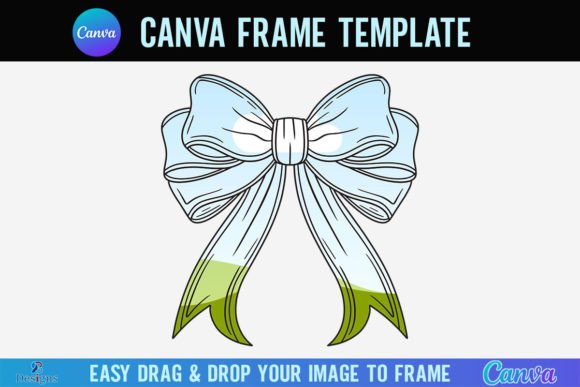
Visually, the template captures the essence of the "coquette" aesthetic—a style defined by soft, romantic, and feminine energy. The central feature is a delicate ribbon forming a bow, creating a natural border or focal point for your imagery. This design choice taps into a current trend of vintage-inspired, soft-grunge visuals that resonate deeply with audiences on platforms like Instagram, Pinterest, and TikTok. The style is whimsical yet sophisticated, making it an excellent choice for brand identity projects that aim to convey warmth, nostalgia, or high-end femininity. It moves beyond the rigid lines of standard modern typography and offers a tactile, organic feel that draws the viewer's eye inward toward the center of the frame.
Practical Application: How to Use the Canva Frame
One of the most significant advantages of the Coquette Bow Canva Frame Template Ribbon is its user-friendly nature. You do not need to be a professional graphic designer to achieve professional results. The paper size is set to a generous 4000x4000 pixels, which ensures high resolution for both digital screens and print-ready formats. To use the template, you simply need a free Canva account. Once you access the file via the link provided in the PDF, you can drag and drop any PNG or JPG background image directly into the frame. The image automatically crops to fit the ribbon shape, saving you hours of manual masking and clipping path work.
For those working with design assets, this functionality is a game-changer. Imagine you are a photographer wanting to showcase a portrait, or a small business owner displaying a product. Instead of a boring square crop, the image is instantly framed by the textured ribbon bow. This adds a layer of packaging design sophistication to your content without the need for expensive software like Photoshop. However, it is important to note the technical requirements for output. If you need to download your final creation with a transparent background, you will need a Canva Pro account or higher. Free users can still use the template effectively but will likely export with a solid color background or utilize the frame on top of other elements within a design.
Strategic Uses for Creators and Brands
Integrating the Coquette Bow Canva Frame Template Ribbon into your projects can significantly enhance your visual hierarchy and audience engagement. The frame acts as a natural visual anchor, guiding the viewer’s attention exactly where you want it. This is particularly useful in editorial design for blog headers or digital magazine covers where you need to break up the monotony of standard text and image layouts.
Here are a few practical ways to leverage this asset across different industries:
- Social Media Graphics: Use the frame to highlight customer testimonials or "photo of the day" posts. The unique shape breaks the scroll pattern, increasing stop-time and engagement.
- Digital Products: If you sell planners, stickers, or digital art on Etsy, framing your previews with this ribbon template adds perceived value. It signals that your product is a premium font or asset collection worthy of the price tag.
- Logo Design Elements: While not a script font or sans serif font, the ribbon frame can serve as a container for a monogram or a brand mark. It pairs beautifully with handwritten fonts or elegant serif fonts to create a complete logo design that feels bespoke.
- Web Design Banners: For e-commerce sites selling beauty, fashion, or lifestyle goods, this frame can be used in hero sections to spotlight new arrivals. It adds a decorative touch that aligns with a romantic brand identity.
Design Considerations and Font Pairing
To get the most out of the Coquette Bow Canva Frame Template Ribbon, you must consider the typography that accompanies it. A frame this detailed requires a balanced typographic hierarchy. Because the ribbon has a lot of texture and movement, you should avoid pairing it with overly busy display fonts or heavy grunge styles. Instead, opt for clean, legible typefaces that allow the frame to shine.
A classic font pairing strategy works best here. Consider using a refined serif font for headings to complement the vintage vibe of the ribbon, paired with a clean sans serif font for body text to ensure readability. For example, a font like Playfair Display (serif) combined with Lato (sans serif) creates a beautiful contrast that feels professional yet approachable. Alternatively, if your brand leans more whimsical, a tasteful script font for the main headline can enhance the feminine energy, provided it remains legible.
When evaluating this template for your project, consider the following:
- Color Palette: The ribbon texture usually works best with soft pastels, creams, and muted tones. Ensure your background image and text colors do not clash with the frame's inherent style.
- Visual Hierarchy: Use the frame to isolate the most important part of your image. Do not clutter the surrounding space with too many competing elements.
- Commercial Licensing: As a digital product, ensure you understand the usage rights. This template is designed for personal and commercial use in your designs, but you cannot resell the template file itself.
Ultimately, the Coquette Bow Canva Frame Template Ribbon is more than just a decorative border; it is a strategic tool for visual storytelling. It allows creators to instantly elevate their social media graphics, packaging design, and web design with a cohesive, professional look. By combining this frame with thoughtful font pairing and high-quality imagery, you can create a brand identity that feels both timeless and trendy. Remember, the goal is to create a connection with your audience, and details like this ribbon frame are often the subtle touches that make a design memorable.
Note: This is a digital product. No physical frames will be shipped. It is a Canva Frame Template file only and is not suitable for use with Cricut Design Space or Silhouette cutting machines.